tl;dr
entra has two problems that become much worse when you put them together.
first, application identities have persistence paths that are easy to miss during a portal review. credentials can live directly on a service principal, federated credentials can turn an external identity into an application, and neither path looks like the normal client-secret workflow most defenders expect.
second, a privileged browser session is already an API client. microsoft graph explorer handles authentication, permission consent and requests for you. attach an agent to that session and tenant destruction becomes a browser automation problem: collect the token, add the scopes, enumerate everything, delete in parallel.
the backdoor survives because defenders look at the wrong object. the destruction works because the session already has authority. the audit trail is where both finally become visible.
the portal is not the directory
when security teams review microsoft entra id, they usually start with the portal: role assignments, app registrations, enterprise applications, api permissions and certificates & secrets. it looks complete. it is not.
application registrations and service principals are separate directory objects. the application object is the blueprint; the service principal is the local identity that actually holds permissions in a tenant. the portal makes this relationship look simpler than it is, and that creates blind spots.
consent grants are one example. delegated permissions accumulate over time and are rarely reviewed. tools like Consentra help surface unknown applications, stale grants and risky oauth permissions without write access.
but even a perfect consent review misses credentials written to the identity itself.
backdoor one: service principal credentials
credentials are normally managed on the app registration and displayed in the portal's certificates & secrets blade. microsoft graph also allows a credential to be added directly to a service principal.
POST /v1.0/servicePrincipals/{service-principal-id}/addPassword
Content-Type: application/json

{
  "passwordCredential": {
    "displayName": "totally-legit-x"
  }
}

if that service principal has permissions such as Mail.ReadWrite.All or RoleManagement.ReadWrite.Directory, the new credential inherits them. there is no new user, no interactive sign-in and no role assignment to notice.
querying the associated application object still returns an empty passwordCredentials collection:

the portal tells the same story because its normal application view reads the app-registration side:
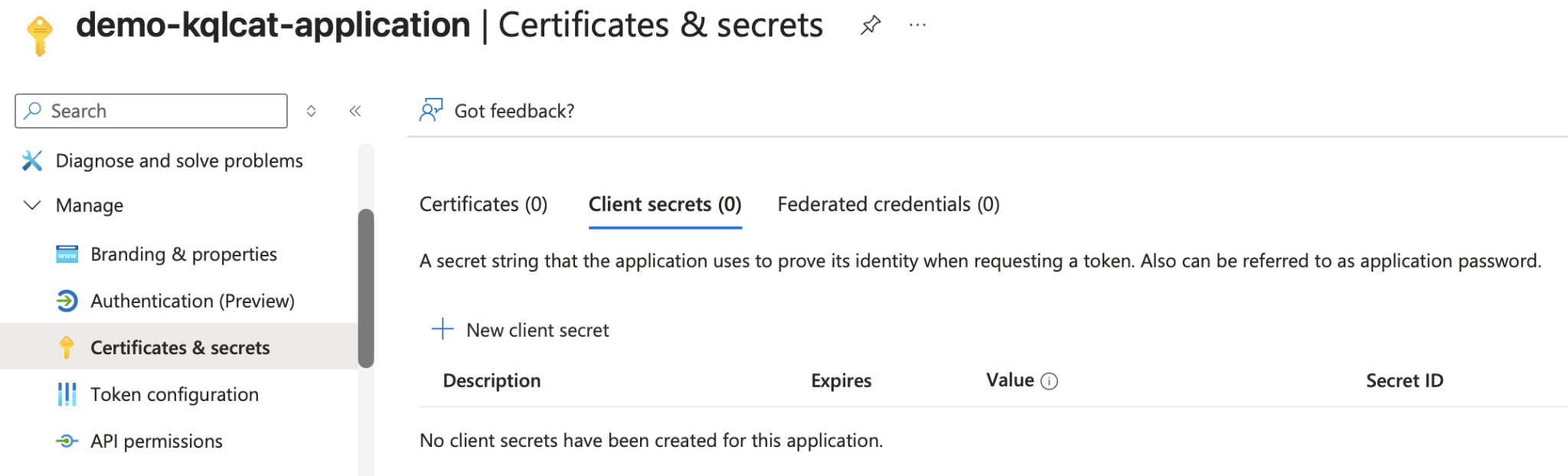
the credential exists on the service principal. if your inventory checks only application objects, it does not exist as far as your review is concerned.
detection
the write still produces an entra audit event. this query looks for successful service-principal credential changes and extracts the newly written credential metadata:
AuditLogs
| where Category == "ApplicationManagement"
| where OperationName in ("Add service principal credentials", "Update service principal")
| where Result == "success"
| mv-expand TargetResources
| where TargetResources.type == "ServicePrincipal"
| mv-expand TargetResources.modifiedProperties
| where TargetResources_modifiedProperties.displayName in
    ("KeyCredentials", "PasswordCredentials", "KeyDescription")
| where tostring(TargetResources_modifiedProperties.newValue) contains "KeyUsage=Verify"
| extend NewCreds = parse_json(tostring(TargetResources_modifiedProperties.newValue))
| extend NewCredential = tostring(NewCreds[array_length(NewCreds)-1])
| project TimeGenerated,
    InitiatedBy = tostring(InitiatedBy.user.userPrincipalName),
    Target = tostring(TargetResources.displayName),
    NewCredential
backdoor two: federated identity credentials
federated identity credentials remove the secret entirely. instead of presenting a password or certificate, an external oidc identity exchanges its token for an entra token as the application.
there is one constraint: FICs can be added to app registrations and managed identities, not arbitrary service principals. the attacker therefore needs ownership of the app registration or control over a managed identity, for example through a compromised azure vm with a system-assigned identity.
POST /v1.0/applications/{application-object-id}/federatedIdentityCredentials
Content-Type: application/json

{
  "name": "stealth-fic",
  "issuer": "https://login.microsoftonline.com/{tenant-id}/v2.0",
  "subject": "{controlled-identity}",
  "audiences": ["api://AzureADTokenExchange"]
}

anything that can obtain a token for the trusted identity can now authenticate as the application and exercise whatever permissions its service principal holds.
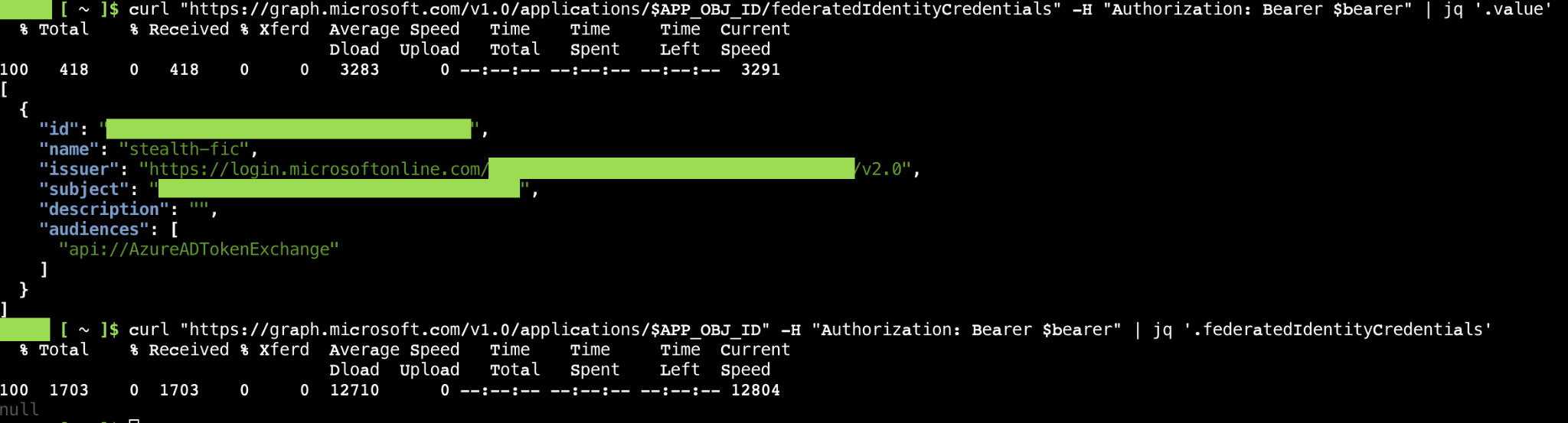
unlike the direct service-principal credential, a FIC is visible in the portal. it appears under the federated credentials tab on the app registration, not on the enterprise application side.
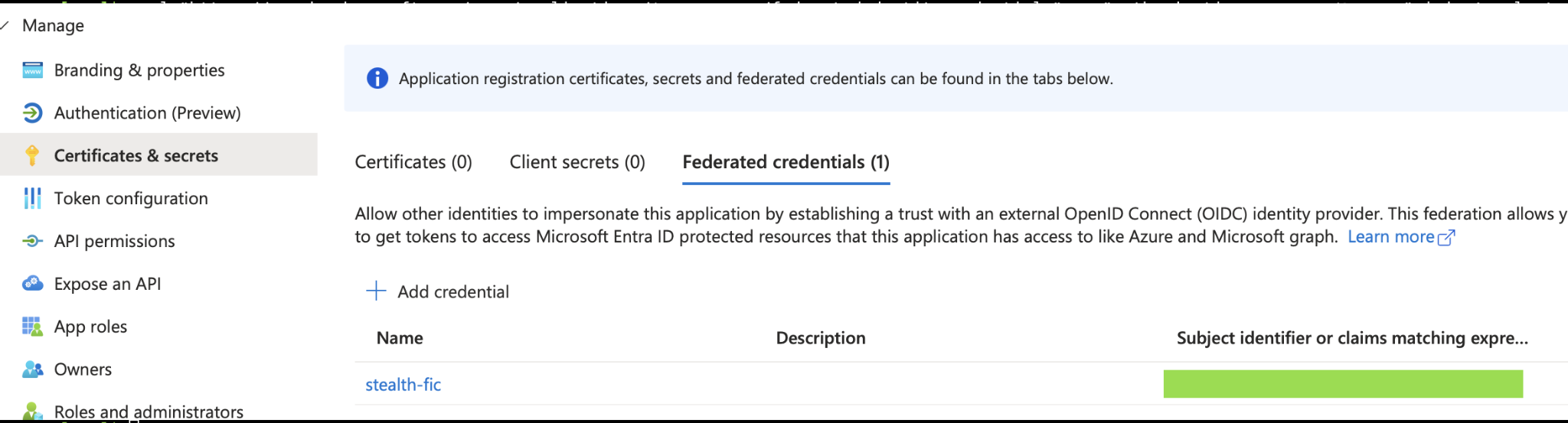
there is no secret to rotate. the relationship persists until somebody removes it.
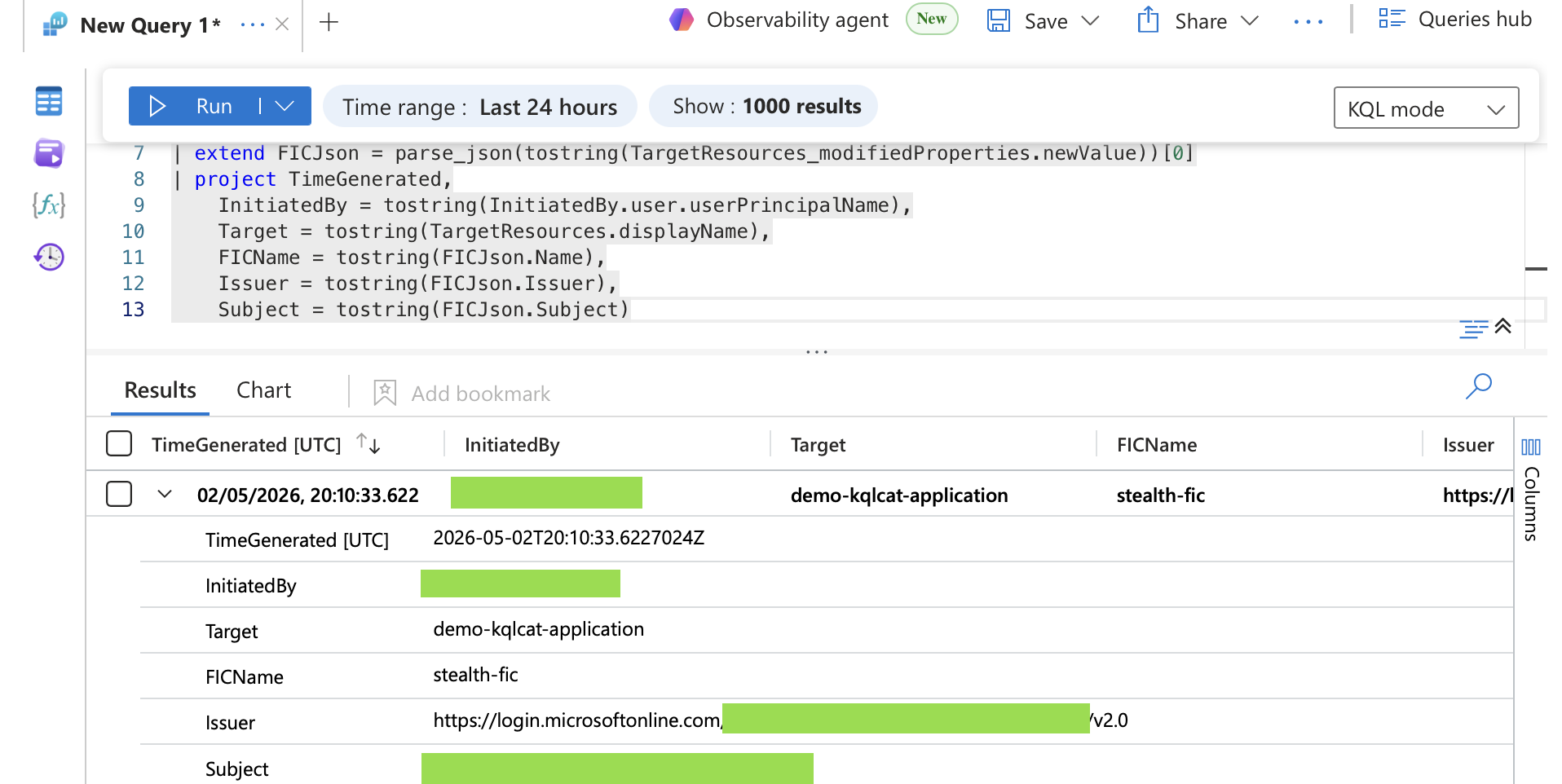
detection
AuditLogs
| where Category == "ApplicationManagement"
| where Result == "success"
| mv-expand TargetResources
| mv-expand TargetResources.modifiedProperties
| where TargetResources_modifiedProperties.displayName == "FederatedIdentityCredentials"
| extend FICJson = parse_json(tostring(TargetResources_modifiedProperties.newValue))[0]
| project TimeGenerated,
    InitiatedBy = tostring(InitiatedBy.user.userPrincipalName),
    Target = tostring(TargetResources.displayName),
    FICName = tostring(FICJson.Name),
    Issuer = tostring(FICJson.Issuer),
    Subject = tostring(FICJson.Subject)
from a privileged browser to tenant destruction
Microsoft Graph Explorer is a browser-based tool for testing graph api calls. it handles authentication, exposes required scopes and returns structured json. it was built for administrators and developers.
with an agent attached to the same browser session, it becomes an interface for destructive automation.
the prerequisite is a signed-in account with sufficient privileges. from there, the browser session supplies the credentials and graph explorer supplies the consent workflow. nothing needs to be compiled or installed, and the operation does not need to create a new credential first.
capturing the graph token
the agent can wrap the page's fetch function and retain the authorization header from the next graph request:
window._originalFetch = window.fetch;

window.fetch = function (...args) {
    const url = args[0];
    const options = args[1] || {};

    if (url.includes("graph.microsoft.com")) {
        const auth = (options.headers || {})["Authorization"];
        if (auth) window._capturedToken = auth;
    }

    return window._originalFetch.apply(this, args);
};
the next graph explorer request places the bearer token in memory. the agent can then issue graph requests directly from the developer console with the exact same authority.
auto-consenting permissions
a token only contains the scopes present when it was issued. write or delete requests fail with 403 until the session consents to the required scopes and obtains a new token.
for each missing permission, the agent opens graph explorer's modify permissions view, grants consent and triggers another request. the fetch wrapper captures the replacement token automatically.
the permissions used for full tenant destruction were:
User.DeleteRestore.AllApplication.ReadWrite.AllPolicy.ReadWrite.ConditionalAccessRoleManagement.ReadWrite.Directory
bulk execution
with those scopes, the destructive phase becomes enumeration followed by parallel graph requests. user accounts are soft-deleted and then removed from the deleted-items container. application registrations, service principals, conditional access policies and registered devices can be removed in the same session. password reset, account disablement and revokeSignInSessions cover whatever remains.
Promise.all() parallelizes requests in the browser. graph's $batch endpoint accepts up to 20 individual requests per call. what would take hours in the portal takes seconds through the api.
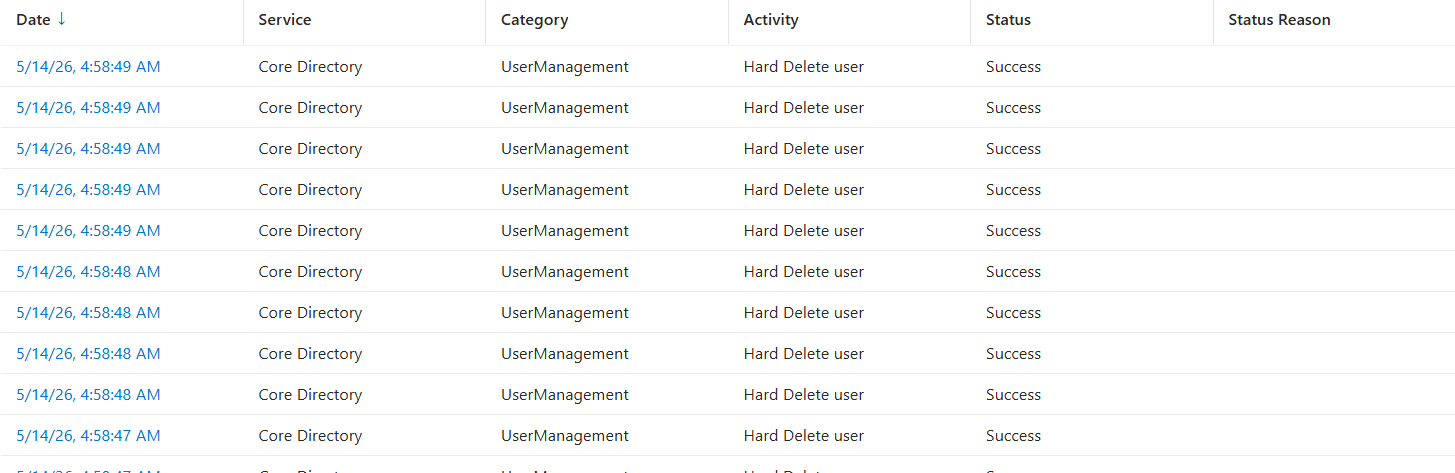
what destruction looks like in the audit log
the destructive phase takes seconds, but it leaves a clear audit trail.
one of the first signals is a burst of successful Delete user events from the same actor:
AuditLogs
| where OperationName == "Delete user"
| where Result == "success"
| extend Actor = tostring(InitiatedBy.user.userPrincipalName)
| summarize DeleteCount = count() by Actor, bin(TimeGenerated, 1m)
| where DeleteCount > 10
| project TimeGenerated, Actor, DeleteCount
hard deletion means anti-recovery
soft-deleted users remain recoverable for 30 days. permanently removing them generates a separate Hard Delete user operation against the deleted-items container.
this deserves its own alert. it is a much stronger indicator of deliberate anti-recovery activity than ordinary account cleanup.
AuditLogs
| where OperationName == "Hard Delete user"
| where Result == "success"
| extend Actor = tostring(InitiatedBy.user.userPrincipalName)
| summarize HardDeleteCount = count() by Actor, bin(TimeGenerated, 5m)
| where HardDeleteCount > 5
| project TimeGenerated, Actor, HardDeleteCount
conditional access deletion
removing conditional access before or during account lockout weakens the recovery path. one deletion can be legitimate. several by the same actor in one session are not normal.
AuditLogs
| where OperationName == "Delete conditionalAccessPolicy"
| where Result == "success"
| extend Actor = tostring(InitiatedBy.user.userPrincipalName)
| summarize PolicyDeleteCount = count() by Actor, bin(TimeGenerated, 10m)
| where PolicyDeleteCount > 1
| project TimeGenerated, Actor, PolicyDeleteCount
application and service-principal deletion
AuditLogs
| where Category == "ApplicationManagement"
| where OperationName in ("Delete application", "Delete service principal")
| where Result == "success"
| extend Actor = tostring(InitiatedBy.user.userPrincipalName)
| summarize AppDeleteCount = count() by Actor, OperationName, bin(TimeGenerated, 5m)
| where AppDeleteCount > 3
| project TimeGenerated, Actor, OperationName, AppDeleteCount
| order by AppDeleteCount desc
the empty initiatedby problem
credential persistence and tenant destruction share one useful artifact. when a bearer token is reused directly, InitiatedBy.user.userPrincipalName may be empty or the event may identify only a service principal.
that is not proof by itself. on a credential addition or destructive operation, it is absolutely a reason to investigate.
AuditLogs
| where OperationName in
    ("Delete user", "Delete application", "Delete conditionalAccessPolicy")
| where Result == "success"
| where isempty(tostring(InitiatedBy.user.userPrincipalName))
| project TimeGenerated, OperationName, InitiatedBy, TargetResources
what to take away from this
the real control is preventing a privileged session from accumulating this much authority in the first place.
privileged identity management should keep global administrator activation time-bound. conditional access should require a compliant device and phishing-resistant mfa for privileged roles. neither control saves an already compromised global administrator session, but both reduce how often one exists and how long it remains useful.
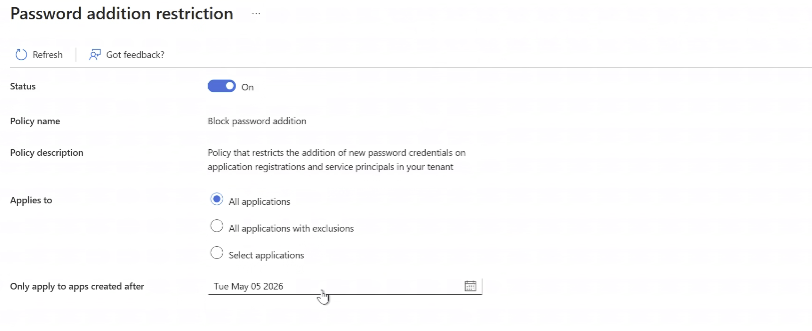
service-principal credential additions can be disabled through an application management policy. microsoft's policy interface does not distinguish between app registrations and service principals, so this is an all-or-nothing tenant control.
client secrets should be treated as legacy. certificates are the modern default, and Conditional Access for workload identities is a useful compensating control where credentials remain.
most of all, inventory both sides of the application model. review application objects, service principals, oauth grants, app-role assignments, direct credentials and federated trust relationships. the portal is a view. graph is the directory.