tl;dr
in this post we talk about an unusual macOS persistence example built around man, the command used to look up documentation in the terminal.
the manual reader can hand the text to a program selected by a system configuration file. changing that selection leaves an execution path on the device that can be triggered the next time a user opens a manual page.
following the manual reader
i started with the relationship between man and its pager. man finds and formats a manual page, while a separate program can handle displaying and scrolling through the text. that second program is the pager; less is a familiar example.
the relevant configuration lives in /private/etc/man.conf. to isolate its pager entries, the file can be inspected with grep:
grep -nE '^[[:space:]]*#?[[:space:]]*MANPAGER[[:space:]]' /private/etc/man.conf
the configuration in the example includes this commented entry:
# MANPAGER /usr/bin/less -s
MANPAGER specifies the display program and its arguments. here, -s tells less to collapse consecutive blank lines. the leading # means this particular line is a comment, so it documents the setting without overriding it.
what caught my attention was that the value selected an executable. the manual reader was not restricted to choosing a display format; it could delegate the job to another program. the example redirected that choice to a small test executable, which is the missing link between the configuration and the execution log.
shell variables can also affect the selection. checking them helps establish whether the configuration file is the only relevant input:
printenv MANPAGER PAGER
i next looked at the c program to understand what counted as evidence that it ran. it opens a local log file in append mode, records the current time and writes its process identifiers. the relevant logging calls are:
time_t now = time(NULL);
fprintf(log, "timestamp: %s", ctime(&now));
fprintf(log, "pid: %d, uid: %d, ppid: %d\n",
        (int)getpid(), (int)getuid(), (int)getppid());
getpid() identifies the test process, getuid() records its user identity, and getppid() identifies its parent. the program also calls uname() to record the operating-system information. these fields make each execution visible without needing the test program to contact another machine.
the distinction between the two runs matters. executing the test program directly only shows that its logging works. the later sequence removes the earlier marker, invokes the manual reader and inspects the newly created file. that is the observation connecting the documentation command to another execution of the test program.
the resulting record includes:
pid: 1483, uid: 501, ppid: 1480
system: Darwin 24.4.0 x86_64
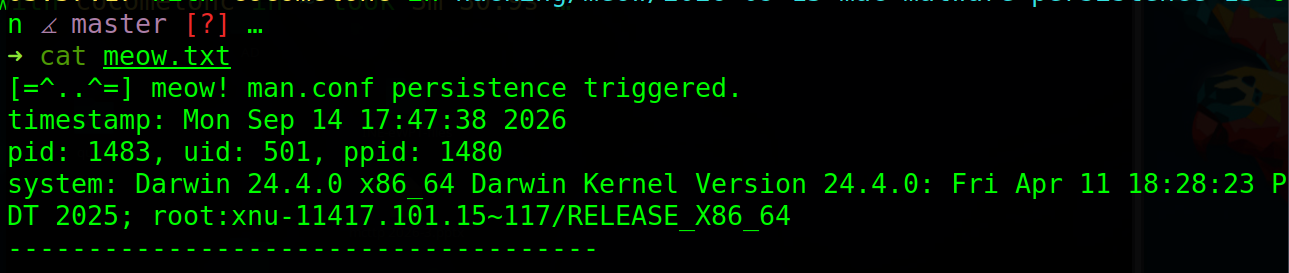
the new marker is the visible result of that sequence. its parent pid alone does not identify the parent executable, but its uid does establish that this execution was under a non-root user identity.
that separates the permissions needed to make the change from the permissions of the program it launches. modifying the global configuration required root; opening a manual page later ran the selected program as the reader's user. this was persistence through a recurring user action, not privilege escalation.
the configuration remains on disk between invocations. it does not need a process running continuously, but it also does not execute itself at login. the trigger depends on the user invoking man through the configured pager.
the recorded environment reports Darwin 24.4.0. i kept that observed version because the accompanying vm label says sonoma and does not match the output.
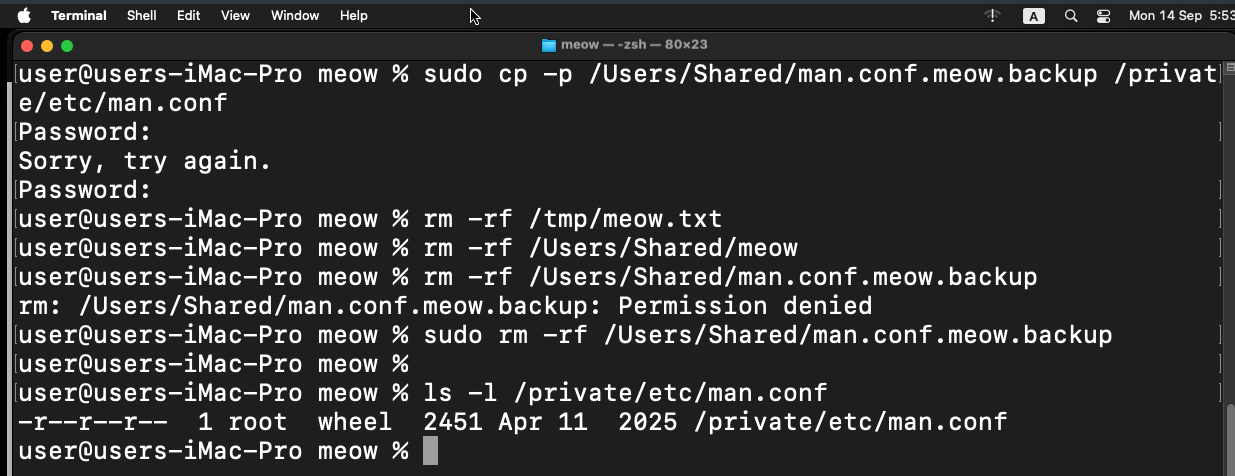
finally, the cleanup shows why deleting the log is insufficient. the log is only the result of execution; the configuration is what selects the program for a later invocation. the sequence restores the original configuration before removing the test files.
what to take away from this
the path starts with a documentation command, passes through its pager configuration and ends in a separately selected executable. the c program and its log make that final step visible.
what makes this interesting is the trigger. the configuration can stay on the device between uses, and an ordinary request to read a manual page can activate it. understanding what man launches matters as much as knowing that the user ran man.